
You can't make them remember.
You can take it off their plate.
Set up the recurring reminders for your partner or loved one with ADHD. Each one reaches them by text or email with a picture and a one tap link to the full reminder. They download nothing and sign up for nothing.

Free to start. Push, text, and email reminders since 2010.

You've become the reminder.
When someone you love has ADHD, the remembering quietly lands on you. Here's the loop that wears you both down.
You set it up once. It works for them.
- You build it, not them: Add your loved one with their phone number or email and set the recurring reminder. They install nothing and make no account.
- It lands in their texts: Each reminder reaches them by text or email with the picture included, plus a one tap link to the full reminder.
- Visual interrupts: Every reminder carries a generated picture that refreshes over time, so a repeat doesn't fade into background noise.
- They can respond: Done, Later, Skip today. One tap tells you it happened, so you can stop checking in.
- Content that stays fresh: Recurring reminders generate fresh content, with a picture that refreshes over time, so the message never goes stale.
- Optional upgrade: If they want it to buzz on their lock screen in real time, they can install the free app and sign in once. Never required.
Whole routines, off your plate.
Chain a visual reminder, a one tap response, and a fresh note into one flow they move through at their own pace. You build it once.
Daily meds, handled
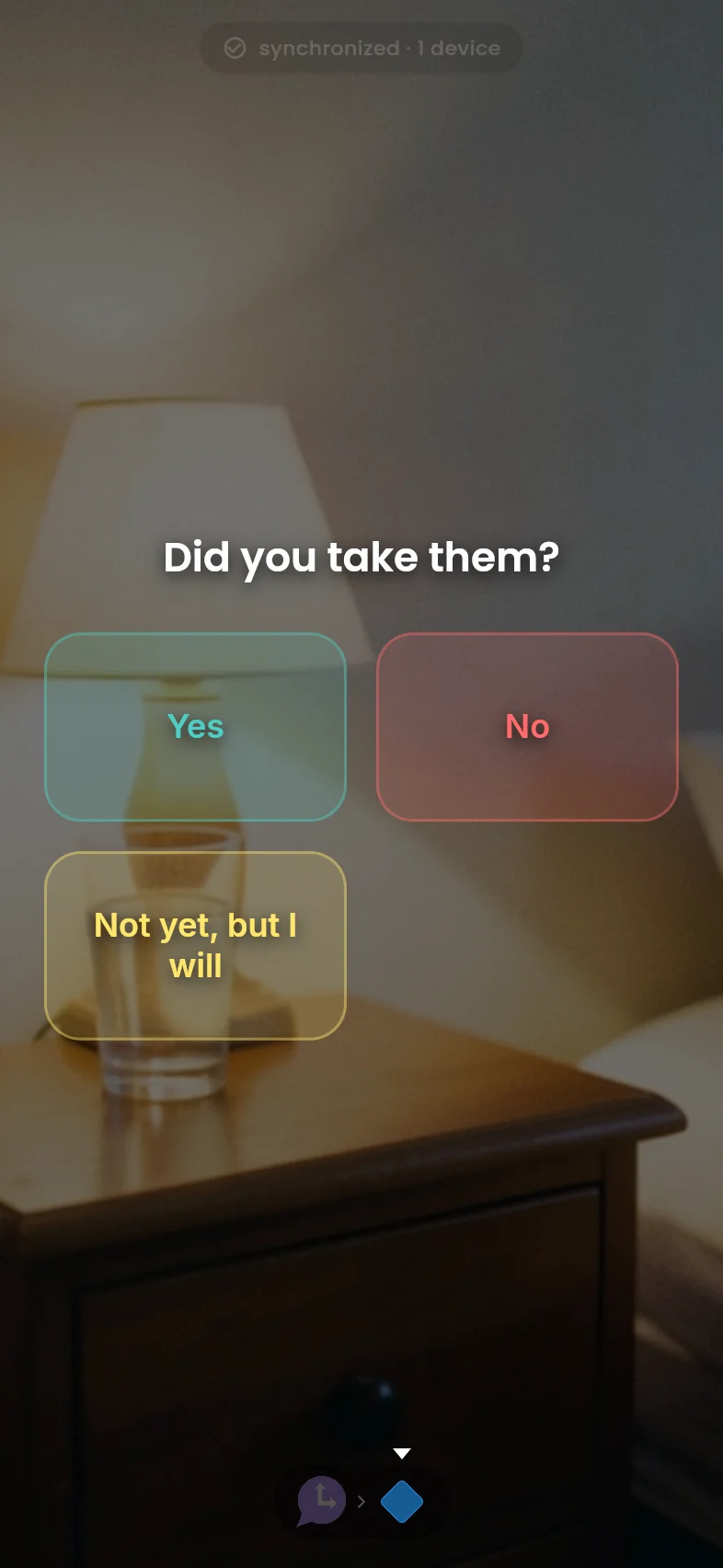
Moment sends a visual reminder with a generated picture: time for the evening dose. Decision asks "Did you take them?" and they tap a quick response. Inspire sends back a quick, different note each time so it never feels like nagging.
 Moment→
Decision→
bolt Inspire
Moment→
Decision→
bolt Inspire

Never miss a pickup
Moment sends a visual reminder: leave now for the 3:15 pickup. Decision asks "On your way?" with On my way, 5 more minutes, and Can't today, so you know without having to text and check.
Moment→
Decision
Appointments that land
Inspire opens with a fresh, encouraging nudge so the reminder feels supportive, not like a chore. Decision then confirms "Ready for your 4 PM appointment?" with Yes, Need a ride, and Reschedule.

Start with one reminder for them.
Every feature is free, with app and email delivery included. Text messages use one credit each: buy a one-time pack, no monthly fee, and credits never expire.
Free
- All visual reminders
- Generated pictures
- All routines
- Recurring reminders
- 10 free text credits to start
Common questions
Does my partner have to install anything?
No. You set up the reminder from your phone. It reaches them by text or email with the picture and a one tap link to the full reminder. Installing the free app is an optional upgrade that adds real time alerts, never a requirement.
Isn't this just nagging them through an app?
It is meant to be the opposite. You set the reminders up once and step out of the loop, so you are not the one chasing them every day. They get a supportive nudge they can respond to, and you stop being the household alarm clock. It works best when it is something you set up together.
Why don't plain phone reminders work?
Plain alerts all look alike and repeat the same words, so the brain learns to skip them. A reminder that changes its picture and asks for a response keeps registering after a plain alarm has gone invisible.
Can I set up medication reminders?
Yes. A medication reminder can carry Took them, Not yet, and Skip today buttons, so a tap leaves a record of whether the dose was taken. Cronote is a reminder app, not a medical tool, and does not give medical advice.
What does it cost?
Free to start. Cronote is free, including app and email delivery; text messages use one-time credit packs that never expire. Paid tiers only raise how many different people you reach by text or email each month.
Will it work across iPhone and Android?
Yes. Reminders go out by text or email, which reach any phone. If they want lock screen alerts, the free app works on iPhone and the web today, with Android on the way.
Take the next reminder off your plate.
Free plan, no credit card. Set up a recurring reminder for someone you love. They install nothing.