
Write one sentence. They get the reminder. You hear back.
Tell Cronote what someone needs to do. It turns your sentence into reminders with times, sends them by text or email, and tells you what the person answered. They pick an answer and send it. No app, no account.
Free to start. Email reminders are free, and a new account includes 10 free text credits.
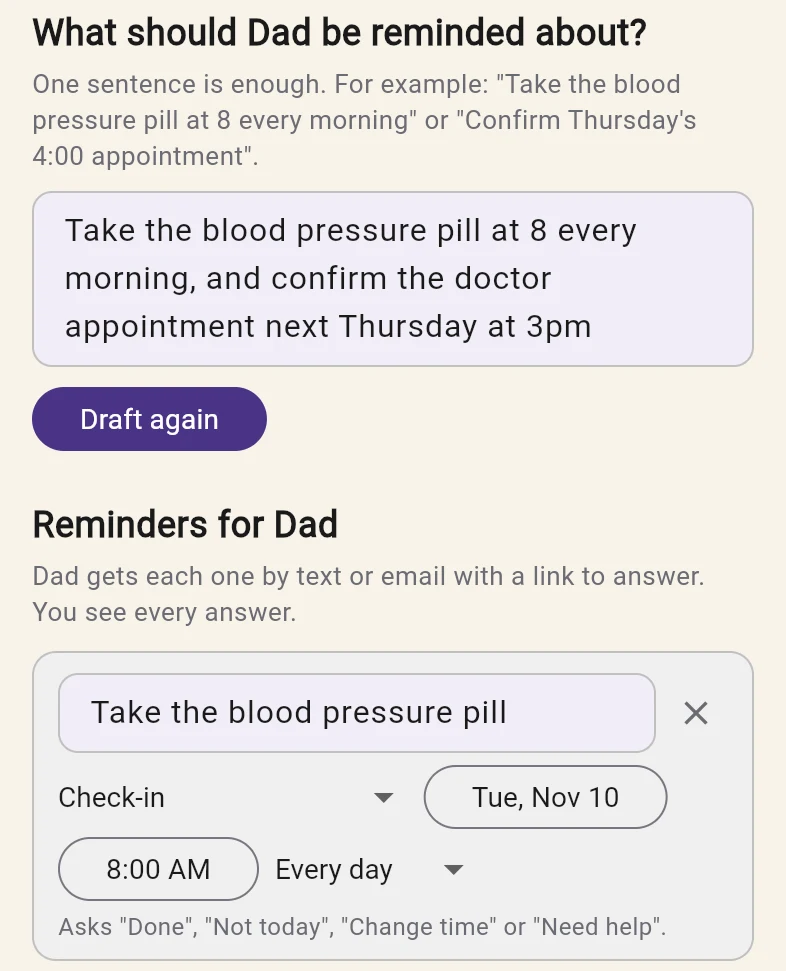
Dad takes his blood pressure pill at 8.
Plus his phone number or email. That is all Cronote needs to start.
- Every day, 8:00 AMBlood pressure pill
- You check it firstChange the wording, the time or how often it repeats, then save.
He taps the link in the message, picks one and sends it:
- Done
- Not today
- Change time
- Need help
An example of the flow. Your draft follows your own sentence, and nothing is sent until you save it.
Four steps, and only the first two are yours.
Name the person
Pick someone from your contacts or add them with a phone number or an email address.
Write one sentence
Say it the way you would say it out loud. Cronote drafts the reminders with times and repeats. You edit anything and save.
They get it and answer
Each reminder arrives as a text or an email with a link. They pick an answer, add a short note if they want, and send it.
You hear back
Cronote tells you what they answered. If their note names a new time, Cronote can suggest the change for you to accept or dismiss.
Things someone else has to do, that you want to know got done.
Family routines
Dad takes his blood pressure pill at 8.
A daily reminder goes to Dad. He answers Done, Not today, Change time or Need help, and you see which one. If nothing comes back in about three hours, Cronote follows up with him once and lets you know.
Appointments and lessons
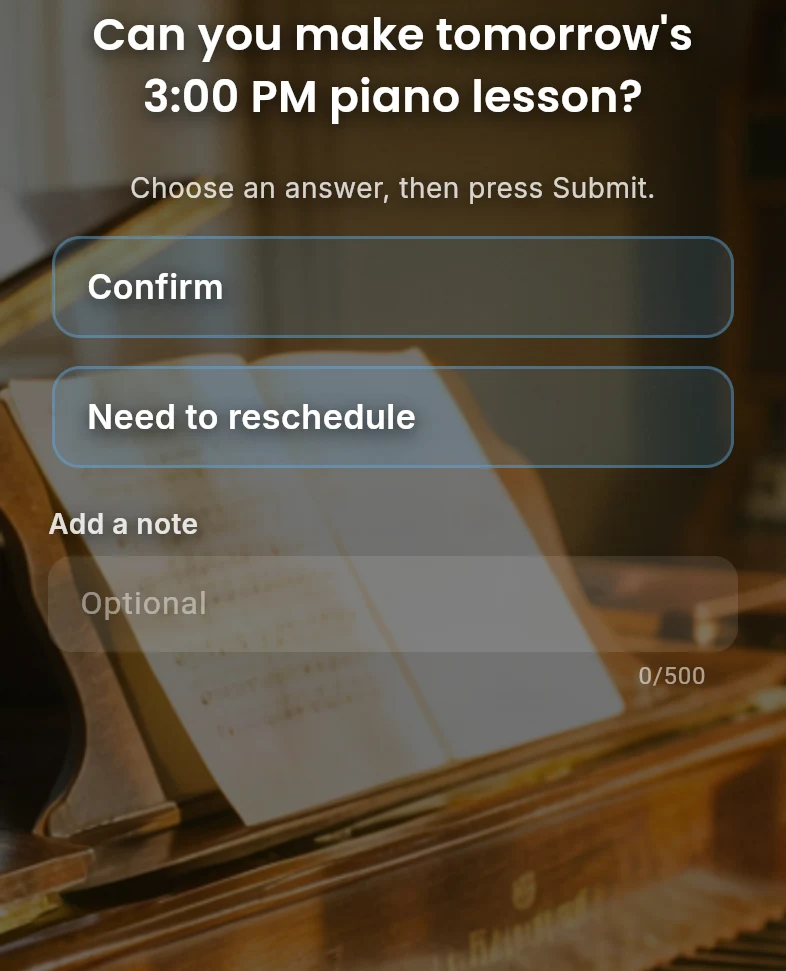
Remind Maya about Thursday's 4pm lesson.
Maya is asked whether she can make it, up to two days ahead, and answers Confirm or Need to reschedule. You find out when she answers, not at 4:05.
A team member's recurring task
Jordan sends the timesheets every Friday by noon.
A weekly reminder goes to Jordan. Done tells you it went out, and Need help tells you it is stuck while there is still time to fix it.
Nothing to install. Nothing to sign up for.
The whole thing has to work for someone who did not ask for a new app. So it is a message and a link.
- A text or an email. It says who it is from and what the reminder is.
- A few seconds to answer. The link opens in the phone's browser with the choices right there. Pick one and send.
- Room for a short note. "Travelling until Thursday" or "can we do 9 instead" reaches you with the answer.
- Answers go to you only. Nobody else sees what they answered or wrote.
- They can stop them. Every message carries a link to stop the reminders.
- Answers come through the link. A reply typed back to the text message is not read yet.
You stop wondering whether it happened.
Every answer, as it comes in
Cronote tells you when the person answers and which answer they picked. Each person has a page with their reminders, the next time each one goes out, and what they said.
Suggested changes, your call
When a note names a new time, or a date to pause until, Cronote can suggest that change for you to accept or dismiss. When it has no suggestion, you still see the answer and the note as they wrote it. Nothing changes without your yes.
Silence gets noticed
When a routine reminder goes unanswered for about three hours, the person gets one follow-up and you are told. For an appointment set up with enough notice, the follow-up goes out the day before.
Email is free. Texts use credits.
Every feature is free, with email delivery included. Text messages use one credit each: buy a one-time pack, no monthly fee, and credits never expire. A person who already uses the Cronote app gets reminders there, free.
Free
- Reminders for someone else, with answers
- Recurring schedules
- Email delivery included
- 10 free text credits to start
Good to know
Does the person I remind need an app or an account?
No. They get a text or an email with a link. The link opens in their phone's browser and they answer there. Only you sign up.
How do they answer?
They tap the link in the message, pick an answer and send it: Done, Not today, Change time or Need help for a routine, and Confirm or Need to reschedule for an appointment. They can add a short note first.
Can they just reply to the text message?
Not yet. A reply typed back to the text is not read. The link in the message is how they answer, and the note field there is where they can tell you more.
What does it cost?
Email reminders are free. Text messages use one credit each, and a new account starts with 10 free text credits. After that, credits come in one-time packs that never expire. There is no subscription.
Who sees the answers?
Only you. Answers and notes are shown to the person who set up the reminders and to nobody else.
Can they stop the reminders?
Yes. Every text and email says who it is from and carries a link to stop them.
Can I change the reminders after I save them?
Yes. You review and edit every reminder before anything is sent, and you can change them later. When a note names a new time, Cronote can suggest that change for you to accept or dismiss. Either way you see the answer and the note as they wrote it.
Who are you keeping track of in your head?
Write the sentence. Cronote sends the reminders and brings back the answers.